Before placing your order, you must confirm that your Motorola device is compatible with this service by checking its model number.
Only the model numbers listed below are currently supported.
XT2205 — Moto Edge (2022) [CDMA]
XT2305 — Moto Edge (2023)
XT2139 — Moto Edge 20 Lite
XT2303 — Moto Edge 40 (2023)
XT2307 — Moto Edge 40 Neo 5G (2023)
XT2409 — Moto Edge 50 Neo 5G (2024)
XT2519 — Moto Edge (2025)
XT2505 — Moto Edge 60
XT2509 — Moto Edge 60 Neo
XT2503 — Moto Edge 60 Fusion
XT2507 — Moto Edge 60 Pro
XT2607 — Moto Edge 70 Pro
XT2163 — Moto G Pure
XT2213 — Moto G 5G (2022) [CDMA]
XT2613 — Moto G (2026)
XT2513 — Moto G 5G (2025)
XT2173 — Moto G31
XT2165 — Moto G Power (2022)
XT2167 — Moto G41
XT2149 — Moto G50 5G (2021)
XT2343 — Moto G54 5G
XT2435 — Moto G55 5G (2024)
XT2529 — Moto G56 5G (2025)
XT2133 — Moto G60s
XT2431 — Moto G64 5G
XT2529 — Moto G66j 5G
XT2621 — Moto G67 (2026)
XT2255 — Moto G72
XT2237 — Moto G73 5G (2023)
XT2527 — Moto G86 5G
XT2527 — Moto G86 Power 5G
XT2271 — Moto G Play (2023)
XT2615 — Moto G Play (2026)
XT2311 — Moto G Power 5G (2023)
XT2415 — Moto G Power 5G (2024)
XT2515 — Moto G Power 5G (2025)
XT2211 — Moto G Stylus (2022)
XT2317DL — Moto G Stylus (2023)
XT2453 — Moto Razr 50 / Moto Razr (2024)
XT2553 — Moto Razr 60 / Moto Razr (2025)
Checking compatibility is quick and should be done before placing your order.
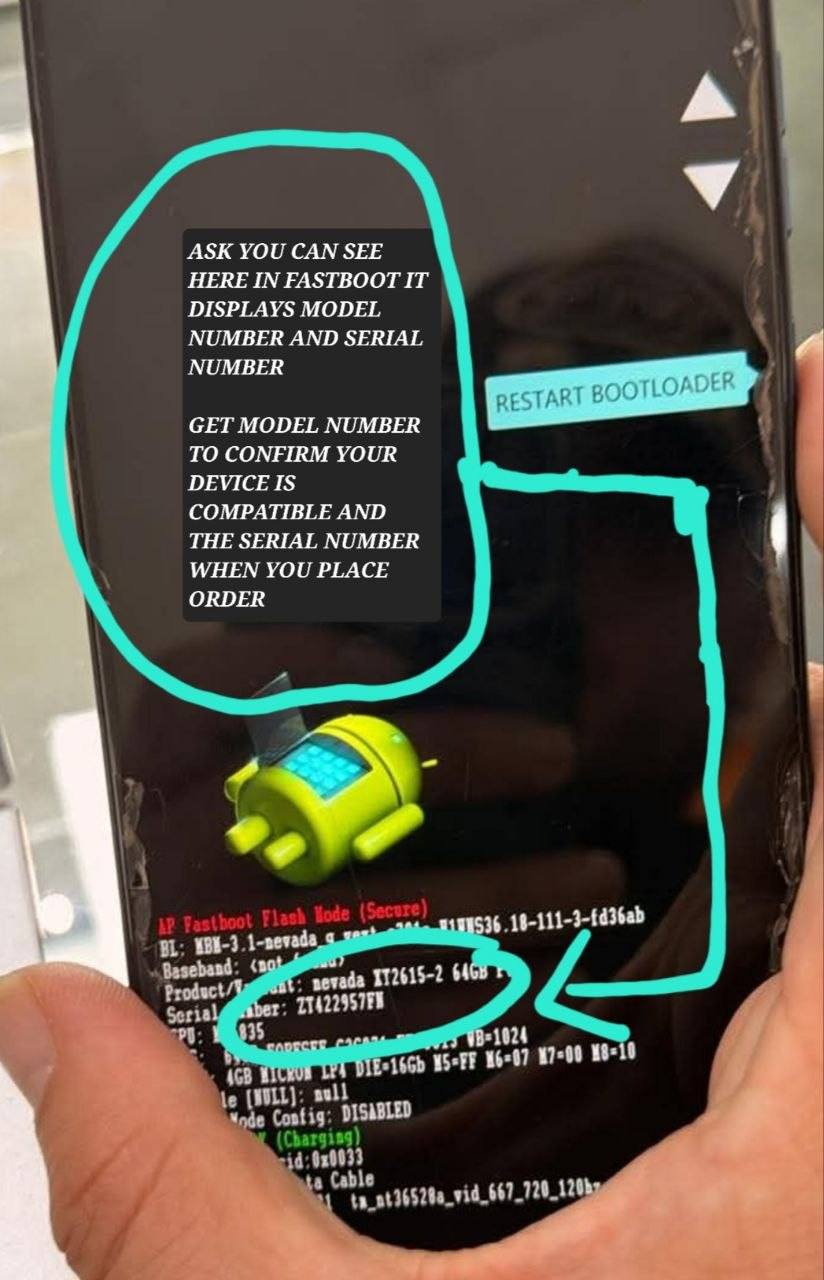
Power off the Motorola device.
Press and hold Power + Volume Down simultaneously.
Continue holding the buttons until the device boots into Fastboot Mode.
Once the device is in Fastboot Mode, the model number and serial number will be displayed on the screen.
Compare the model number shown on your device with the list above.
Example:
If your device displays XT2615, the model is currently listed as supported for this service.
Only proceed with your purchase if your exact model number appears on the supported list.
Please follow the steps below carefully to ensure your order is processed correctly and without unnecessary delays.
Power off the device, then press and hold Power + Volume Down simultaneously until the device enters Fastboot Mode.
While the device is in Fastboot Mode, locate the Serial Number displayed on the screen and enter it in the designated field before placing your order.
This information is required to properly identify your device.
⚠️ Important: If no valid serial number is provided, your order may be rejected. You may then be required to place a new order using the correct serial number.
After placing your order, contact our team through Live Chat and provide your order number so we can begin processing your service.
Once your order has been successfully completed, you will receive a notification. Your order status will also be updated to Successful on our website.
Please make sure all information is accurate before submitting your order to avoid delays or the need to reorder.
Delivery time: 10-20 MINUTES
Bulk orders allowed: No
Order type: Serial number
Service type: Other
Submit to verify allowed: No
Cancellation allowed: No
Order processing: Manual